top of page

iDX | CLOSED-LOOP SERVO TENSIONER


Product Features
High speed, closed-loop DC servo tension control
Precise, stable tension with fast response and
anti-stall performance
Centralized HMI touchscreen for remote tension setting and status monitoring
Intelligent 8-segment tension settings with storage for up to 30 product recipes
Dual tension compensation for accurate and consistent multi-unit output
Wire-break and upper/lower tension alarms with adjustable delay
Daisy-chain networking supports up to 24 tensioners with Modbus/CANopen integration
Dedicated threading mode with tension-rod protection for safe wire threading
iDX | PRODUCT MODELS

iDX | GUIDE | iH500C COMMUNICATOR
Before use, the tensioner, winding machine, and HMI touchscreen must be properly connected and configured.
iH500C
Communicator
Modbus TCP, RS485 and RS232 communication interfaces
Product recipe switching via external I/O
8-segment tension switching via external I/O
Synchronized control of up to 35 tensioners via daisy-chain connection

iDX | GUIDE | CONNECTION SETUP
Before use, the tensioner, winding machine, and HMI touchscreen must be properly connected and configured.
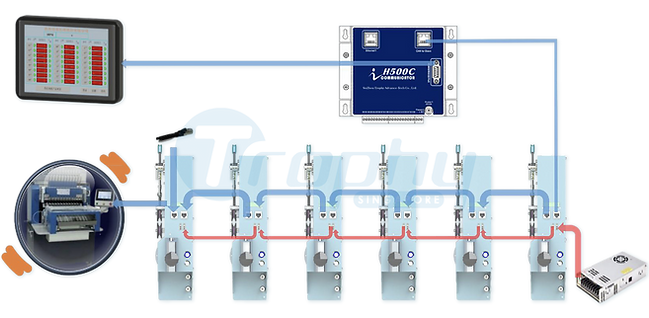
Connection
Setup
Link the first tensioner to the iH500C CAN Slave port via
RJ45 network cable. In this setup, a Category 7 cable is used.
Link the HMI touchscreen RS485 port to the iH5000 RS485 port
Daisy-chain the RJ45 ports and power sockets between all tensioners
Terminate the last tensioner with the supplied RJ45 matcher
Link the last tensioner signal port to the winding machine
iDX | GUIDE | HMI TOUCHSCREEN - KEY OPERATIONS
Before use, the tensioner, winding machine, and HMI touchscreen must be properly connected and configured.

This screen shows real-time tension and status for up to 24 tensioners, with color-coded indication of tension range and connection status.
Click to access the product model catalog when changing tensioner parameters
Select "485" to connect the iH500C to the HMI via RS485.

This screen shows the product model catalog for quick product switching. Click the corresponding “Modify” button to edit the tensioner parameters.
Click to enter the Tension Setting interface and edit or set the parameters
Select a product serial number, then click to distribute the parameters to all online tensioners
iDX | GUIDE | INSTALLATION DIMENSIONS
Before use, the tensioner, winding machine, and HMI touchscreen must be properly connected and configured.

bottom of page